Classic Advice Animal Memes
Recreate classic image-macro formats with heavyweight white text and thick black borders. Position setup lines across the top and punchlines along the bottom without watermarks, logins, or unnecessary graphic clutter.
Create bold meme captions with our free impact font generator using open-source Anton lettering, custom outlines, top and bottom placement, and transparent PNG downloads.
Create classic meme captions in seconds with our free impact font generator. Type your words to render bold white capital letters with thick black outlines directly in your web browser. Customize outline stroke thickness and character spacing, then save your finished graphic as a clean, transparent PNG without creating an account or uploading files.
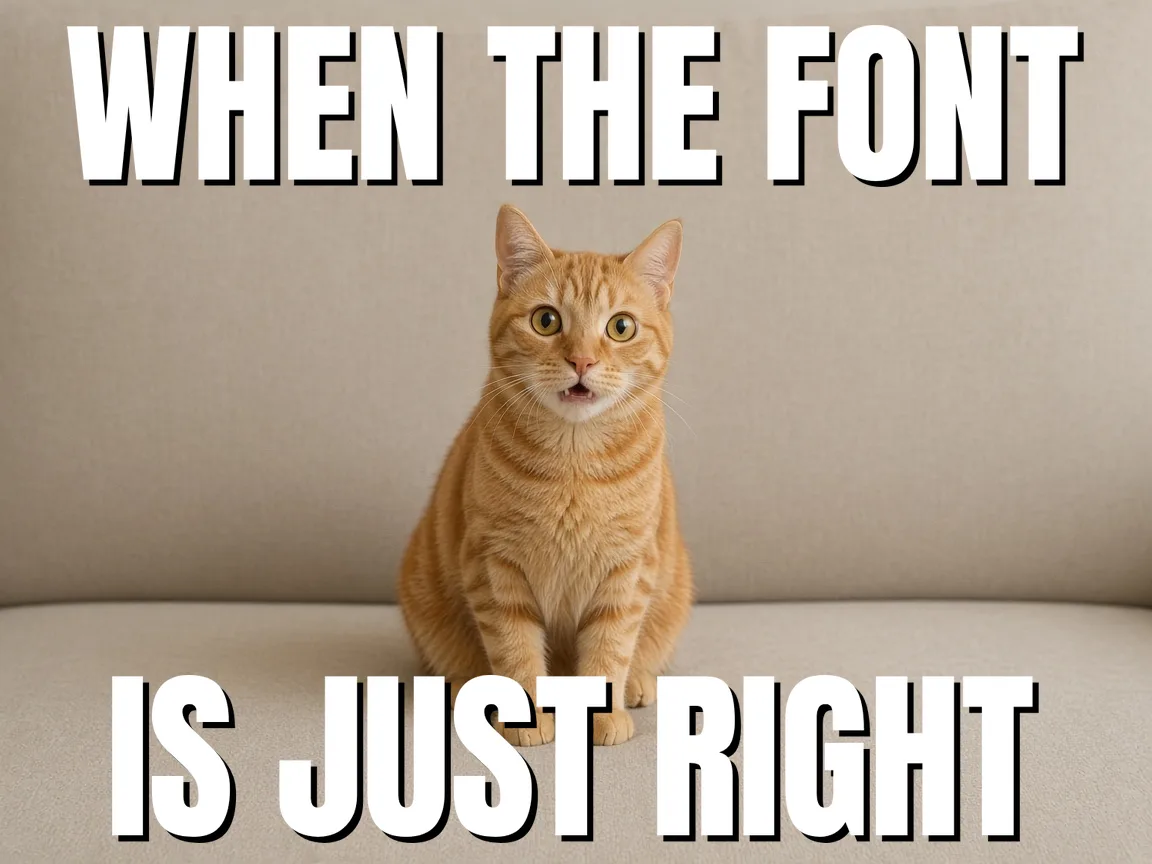
Type your message into the top text, bottom text, or both input fields.
Change font size, line spacing, and outline thickness using the live slider controls.
Load an image from your computer to preview your caption directly on top.
Download a crisp PNG file with your chosen image or a transparent background.
Recreate classic image-macro formats with heavyweight white text and thick black borders. Position setup lines across the top and punchlines along the bottom without watermarks, logins, or unnecessary graphic clutter.
Export transparent PNG graphics to drop into video timelines, short clips, reels, or Discord server stickers. The high-contrast black stroke guarantees high readability against moving video backgrounds and fast-scrolling mobile feeds.
Add recognizable humor to lecture slides, conference decks, or team training handouts. Bold meme headlines break up dry technical topics and keep students or colleagues engaged without taking hours to design.
| Feature | ✦ Cursive Generator | Traditional Meme Generators |
|---|---|---|
| Account Requirement | ✓None; no account or sign-up needed. | –Often requires an account to download. |
| File Privacy | ✓Client-side rendering; your files stay in your browser. | –Images are uploaded to remote cloud servers. |
| Export Watermarks | ✓Clean output with zero forced watermarks. | –Frequently adds site watermarks on free tiers. |
| Transparent Export | ✓Exports transparent PNG files without background image. | –Usually exports flattened JPEG files only. |
| Font Licensing | ✓Built with open-source Anton under SIL OFL. | –Proprietary fonts may lack clear open licenses. |
Generate classic meme typography featuring crisp white lettering and heavy black outlines that remain legible across any background.
The renderer reproduces the signature condensed sans-serif look by pairing white fills with outer black borders. Because changes calculate locally in real time, you can quickly optimize text layouts for different graphic contexts.
Download transparent PNG files containing only your styled text and borders, ready for immediate drag-and-drop layering.
Export text with zero background rectangles or solid matte fills for seamless visual compositing.
Drop exported graphics straight onto photos, video timelines, or digital presentation slides without manual masking.
Draw and download graphics instantly on your device without server latency or network upload delays.
Generate multiple title overlays back to back and import them directly into your favorite editing software.
Every rendered PNG preserves crisp outer borders and sharp edges for predictable compositing across image and video editors. Local generation ensures rapid iteration without waiting for remote file conversions.
Process every graphic locally on your machine with zero server uploads, no accounts, and no paywalls.
Because computation runs entirely on your local hardware via HTML5 canvas, the tool operates reliably without remote queue delays. Your creative inputs remain private during your session while delivering responsive, instant exports.
Try also: name in cursive · cursive worksheets · tattoo fonts · wedding calligraphy · gothic fonts · signature generator · best free cursive fonts
Yes. Every image downloads as a transparent PNG with no solid backdrop. The file contains only your white letters and their black stroke outline, which allows you to place the graphic over photos, video clips, and colored slides without any extra cropping or background removal.
No. All text rendering and image generation happen locally in your web browser. Your text stays on your computer and is never sent to a remote server or stored in a database. When you close or refresh the page, your session resets completely.
Yes. Use the stroke thickness slider to make the black border narrower or wider, and use the spacing slider to adjust the distance between characters. All changes update instantly on the screen so you can verify the look before exporting.
No. The impact font generator is completely free to use with no login, account creation, or payment required. You can generate and download as many transparent PNG images as you need without watermarks or download restrictions.
Yes. You can use the exported transparent PNG graphics in any personal or commercial project, including videos, social posts, articles, and presentations. Because the files are rendered directly on your device, there are no licensing fees or restrictions on how you use them.
Cursive Generator provides a free in-browser tool designed specifically to create classic meme typography. You simply type your caption to render bold white capital letters bounded by sharp black outer strokes using client-side HTML5 canvas. You can customize the outline thickness and letter spacing live on your screen, then download a clean transparent PNG without installing software or creating an account.
Yes, you can drop the exported graphics directly into external video editors, graphic design tools, or presentation slides. Cursive Generator exports your caption as a transparent PNG containing only the white letters and black border, with no solid background or matte fill. This clean alpha channel allows seamless layering over photo backgrounds and video timelines without any chroma keying or masking.
Yes, Cursive Generator displays every typography adjustment instantly on your screen via live browser rendering. When you type new words or adjust the sliders for outline stroke thickness and character spacing, the visual canvas updates immediately without lag. This real-time feedback lets you fine-tune the exact balance of contrast and spacing before saving your finished transparent PNG graphic.
You can adjust Cursive Generator's continuous character spacing slider to keep long phrases readable across horizontal layouts. Instead of locking you into rigid default font widths, the tool gives you fluid control over letter spacing so you can expand or condense your caption. This flexibility ensures your text fits neatly across wide social banners, thumbnails, or slides without crowding adjacent characters.
Yes, you can generate and download multiple meme text graphics in rapid succession without server processing delays. Because Cursive Generator executes all text rendering locally on your device with HTML5 canvas technology, graphics are drawn and saved instantly. You can quickly produce dozens of caption variations for different scenes or thumbnails and immediately import them into your external editing workflow.
Classic meme text maintains legibility by placing bold white capital lettering inside thick black outer borders. Cursive Generator reproduces this high-contrast aesthetic and lets you adjust the outline stroke weight continuously. The heavy black stroke separates the white letters from bright backgrounds, dark shadows, and complex visual elements, ensuring your text stands out clearly on any photo, video, or presentation slide.
Type your punchline, customize the outline width, and save a clean transparent PNG directly to your computer.
Generate Meme Caption →